
Charts
Timeline Displays Average U.S. Internet Speeds Over Time

In 1993, when the Internet became publicly available, the average speed was 14.4 Kb/s, and today, the average speed is 214 Mb/s. These are huge leaps in speed that can be difficult to understand. The team at Ooma shows the progression of this leap with a timeline of Internet speeds year by year. Tracking these Internet speeds can help us understand the technological developments that made this possible and show how the Internet has proliferated in daily life.
Click below to zoom.
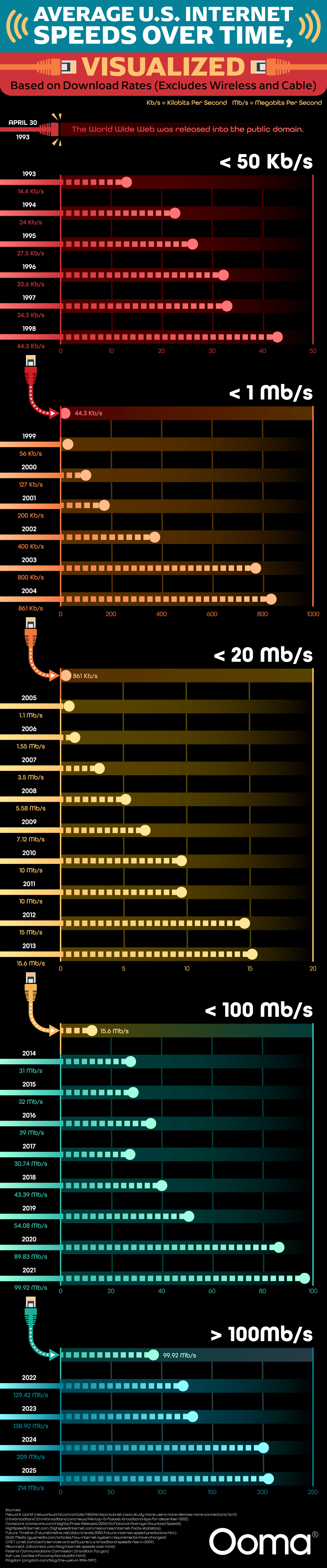
At the top of the timeline, we see Internet speeds throughout the ‘90s at their slowest. Internet users had dial-up modems using phone lines to connect to the web. This was the slowest version of Internet technology we have seen on the timeline. The team provides context for the speed, explaining it would take almost four seconds to download an image of a meme, 11 minutes and 41 seconds to download an MP3 file of a song, and almost 34 hours to download the film, “The Dark Knight.” The peak speed reached in the dial-up era was 44.3 Kb/s. The graph shows significant jumps in speed in 1999, 2005, 2014, and 2022. These jumps occurred mainly due to technological advances, such as the creation of broadband and satellite Internet, as well as the expansion of access to higher speeds.
Context for today’s speeds compared to the past shows that it takes less than a second to download a meme, half a second to download an MP3, and only 8 seconds to download a long movie like “The Dark Knight.” Even though there have been vast improvements, the United States doesn’t have the fastest Internet speeds in the world. Singapore and the United Arab Emirates have higher speeds. The team tells us this is because of America’s vast landmass. It has been a challenge to provide high-speed Internet to rural areas, but there have been big improvements. Thanks to satellite Internet connections, people in more remote areas can have access to higher speeds.
Current projections show that by 2025, most of the world will have Internet access, even in remote areas with less infrastructure. The best equipment will be able to download a terabyte of data in just seconds through the use of fiber-optic cables, which are much faster than coaxial cables.
While there’s been great progress in providing high-speed Internet to rural areas, millions of Americans still don’t have access to high-speed Internet. The challenge is how to connect these locations to broadband. There are countless ways we have seen the Internet improve quality of life for people, from bringing them the ability to use telehealth, to social connections, to remote work opportunities. Timelines like this one from Ooma highlight progress but also remind us of the work that still needs to be done to improve American infrastructure. When we’ve seen such huge leaps in speeds, it’s not fair for some people to lack access to reliable Internet because of where they live.

A new study by LLC Attorney examines the booming side-gig economy across the United States, identifying which states have seen the largest increases in freelance work and why. The piece introduces us to an expanding “Gig Economy” driven by apps and services like Uber, DoorDash, and Fiverr. These apps have made on-demand work accessible on a wide scale. While the side-gig economy is growing overall, the team shows that growth isn’t evenly distributed. Some states have far more gig workers than others.
Click below to zoom.
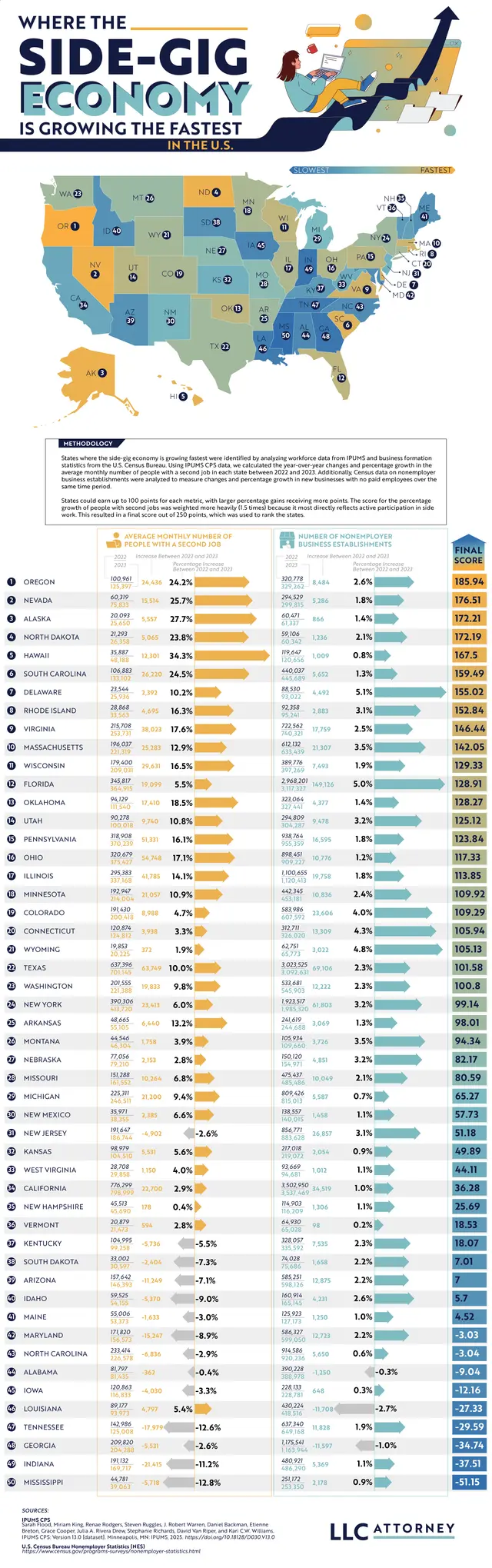
To get the data needed to create the map, the team analyzed year-over-year changes in the average monthly number of people holding a second side gig job and the growth of non-employer business establishments. Drawing on data from IPUMS CPS and the U.S. Census Bureau, the team created a color-coded map.
The top five states show us an interesting geographic picture. Oregon claimed the number one spot with a 24.2% rise in the average monthly number of people working a second gig job. Oregon has the highest number of gig workers in general. Nevada had one of the largest increases, at 25.7%, thanks to its tourism-heavy economy, which naturally generates demand for ride-sharing, Airbnb, and delivery services. Alaska takes third place, despite its smaller population. It had a 27.7% increase, while North Dakota follows in fourth with a 23.8% rise. Hawaii rounds up the top five with a huge 34.3% jump in residents working two jobs between 2022 and 2023.
These specific states lead the way because of two recurring issues. High costs of living, with rising costs of food, healthcare, and housing outpacing wage growth in these regions, lead more people to take on second jobs out of necessity. Hawaii has steep grocery and housing costs; Oregon and Nevada face similar cost-of-living issues.
These top-ranking states might appear to be thriving if we look at the Gig Economy numbers, but they have less diverse job markets, often relying on tourism. These seasonal and unpredictable jobs lead workers to seek ways to diversify their income.
The top ten states with the biggest gig economies are:
- Oregon
- Nevada
- Alaska
- North Dakota
- Hawaii
- South Carolina
- Delaware
- Rhode Island
- Virginia
- Massachusetts
Gig work can be convenient and a big asset to small business owners, but it also has downsides. Gig roles rarely include health insurance or benefits, income tends to be inconsistent, and the work is for people who don’t mind flying solo without coworker interaction. It does support independence and a flexible work schedule for people who value those qualities.
This map helps us understand the lasting changes the gig economy has had on the American economy. Side gig trends reflect how workers respond to economic changes, whether they face setbacks or opportunities. Side gigs create a fairly straightforward, low-effort way to make money, but they also drive steeper competition for jobs. Visualizing data can help us understand what drives economies and helps gig workers decide what opportunities will help them grow.
Most of us get tired of brands asking for our phone numbers and email addresses because we’re spammed with too many advertisements. But sometimes, providing your contact information will connect you with a brand’s loyalty program, which can offer discounts, free prizes, and cash back. One in ten companies has a loyalty rewards program, so the team at Qualtrics decided to analyze which one gives you the biggest return on investment. They focused only on base-level, free-to-join programs that give customers rewards through regular shopping; that way, the results truly reflect the rewards you earn for the money you spend.
Click below to zoom.
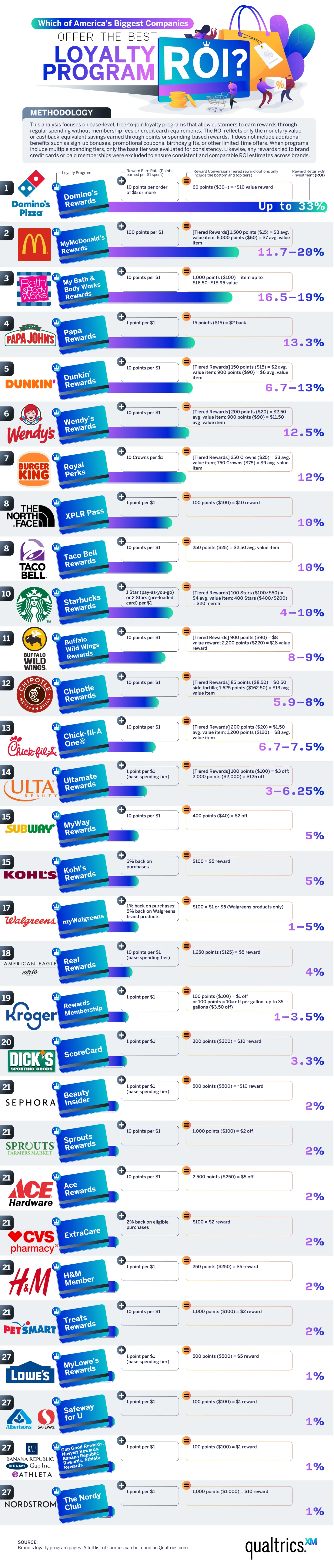
In the food and beverage industry, Domino’s Pizza offers the best ROI. The team calculated an almost 33% ROI for Dominos, which is by far the best offer, even across industries. You’ll receive about $10 of free food for every $30 spent. McDonald’s isn’t far behind at an 11 to 20% ROI with the MyMcDonald’s Rewards app. You’ll earn 100 points for every dollar spent, and you can use these points to purchase menu items. Papa John’s, Dunkin’, Wendy’s, and Burger King also have strong programs, with ROIs between 10% and 13%. The fast-food industry offers some of the best loyalty programs, earning eight out of the ten best rewards programs on the list.
In the retail and beauty space, Bath & Body Works leads with a 16.5%–19% ROI through the My Bath & Body Works Rewards program. The program allows shoppers to redeem points earned through purchases for free items, early access to sales, and an annual birthday gift. Ulta Beauty’s Ultamate Rewards program offers a decent ROI, too, at 3% to 6% for items that are normally on the expensive side. Their competitor Sephora has a Beauty Insider program that offers a lower 2% ROI, but exclusive free samples and early access to new products supplement it.
Brand rewards are weaker among clothing retailers. H&M, Gap Inc., and American Eagle/Aerie offer a 1%–4% ROI. These programs are still useful for loyal shoppers who know they’ll buy from these brands repeatedly.
Pharmacy and grocery store rewards can be a great help for budget-savvy shoppers. These stores have lower ROIs but can still offer decent rewards. Walgreens’ program took the lead, offering 1% back on most purchases and 5% back on Walgreens’ brand products, resulting in significant savings on generics. CVS has an ExtraCare program with a higher 2% ROI and personalized coupons.
In the grocery sector, Kroger and Safeway/Albertsons offer the highest ROIs, between 1% and 3.5%. These chains also offer a fuel rewards program that can be an incredible budget-saving boon. Lowe’s and Ace Hardware offer 1%–2% rewards programs that may be most helpful to frequent shoppers and small business owners who need materials from these stores.
Outdoor lovers and athletes can earn powerful rewards through the North Face’s XPLR Pass, which offers a 10% ROI, and the Dick’s Sporting Goods ScoreCard program offers a 3.3% ROI. The findings on this chart can help you save big the next time you shop!
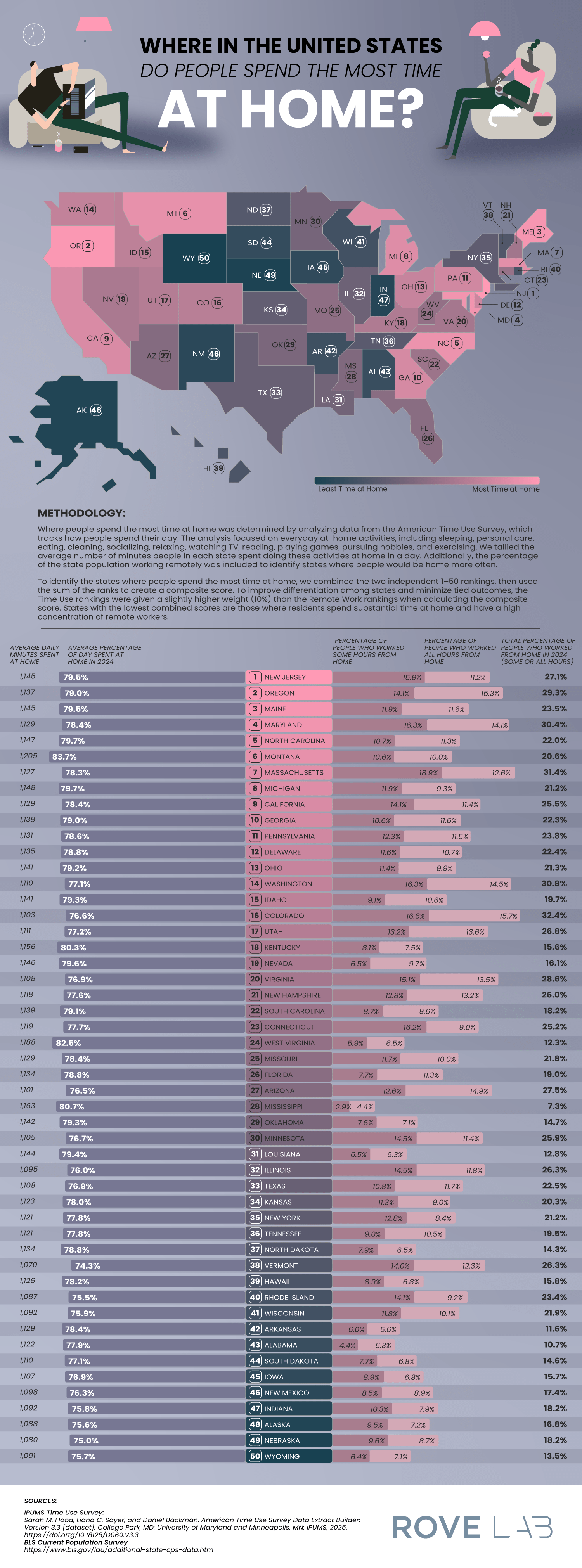
A new article from RoveLab presents a data-driven exploration of home-life habits in the United States, examining how much time Americans spend at home and how that changes across each state. Drawing on data from the American Time Use Survey and the Integrated Public Use Microdata Series, the study constructs a ranking of states based on how much time residents spend at home. This data combined at-home activity levels with remote work prevalence.
RoveLab situates its analysis within broader behavioral shifts in the American lifestyle. On average, Americans spend around 18 hours per day at home (including sleep), which reflects a gradual decline in time spent outside the home over the past two decades. This trend pre-dates the COVID-19 pandemic, which spiked time spent at home and prompted the rise of remote work.
Click below to zoom.
Other important facts on time spent at home add more context:
- 80% of Americans engage in daily household activities like cleaning, cooking, and home maintenance.
- 94% of Americans participate in leisure activities at home, including gaming, socializing, and exercise.
- Most Americans watch about 3.57 hours of television daily, which is more than the average amount of daily time spent on household tasks.
These statistics show that a home is the central site of both productivity and leisure, underscoring the growing connection between work and private life.
To determine which state residents are the most homelife-centric, the researchers developed a scoring system that incorporated:
- Average percentage of the day spent at home
- Average daily minutes spent at home
- Percentage of residents working remotely
- Weighted ranking emphasizing time-use data slightly more than remote work numbers
This multi-factor approach shows the team’s effort to balance behavioral statistics with labor trends, offering a comprehensive view of domestic time use.
The team found that residents in these states spend the most time at home:
- New Jersey: 5% of the day is spent at home (1,1495 minutes) and 27.1% of residents work remotely.
- Oregon: 79% of the day is spent at home and 29.3% of residents work remotely.
- Maine: 79% of the day is spent at home and 23.5% of residents work remotely.
New Jersey’s lead position is due to several structural factors, such as its proximity to major employment centers and a highly educated workforce, with over 40% of residents holding a bachelor’s degree. These factors create a population ideal for telecommuting. It shows us that socioeconomic factors can shape our daily routines.
At the low end of the scoring, Wyoming ranks as the state where people spend the least amount of time at home. This reflects a low rate of remote work. Montana relies on industries like agriculture, mining, and tourism, which all require in-person workers. The team also speculates that Wyoming’s emphasis on outdoor recreation leads residents to both work and play outside their homes.
By combining time-use data with employment patterns, the study provides valuable insight into how regional differences, evolving job requirements, and leisure habits shape modern American life.
-
 Business Visualizations2 years ago
Everything Owned by Apple
-
 Business Visualizations1 year ago
America’s Most Valuable Companies Ranked by Profit per Employee
-
 Business Visualizations1 year ago
The Biggest Fortune 500 Company in Every State
-
 Business Visualizations11 months ago
The Biggest Employers by Industry
-
 Business Visualizations2 years ago
New Animated Map Shows Airbnb’s Fully Booked Cities Along the 2024 Eclipse Path of Totality
-
 Timelines1 year ago
Timeline Charts the Development of Communications Technology
-
 Charts2 years ago
How Many Crayola Crayon Colors Are There? A Lot.
-
 Business Visualizations6 months ago
The Largest Companies in America That Are Still Run by the Person Who Founded Them